
Billing and plans
Billing (at the bottom of the navigation) shows your workspace’s plan and where it comes from, what the workspace uses, the two ways to change plan (upgrade online, or a licence key), and your invoices. Only workspace admins change the plan.
Your plan
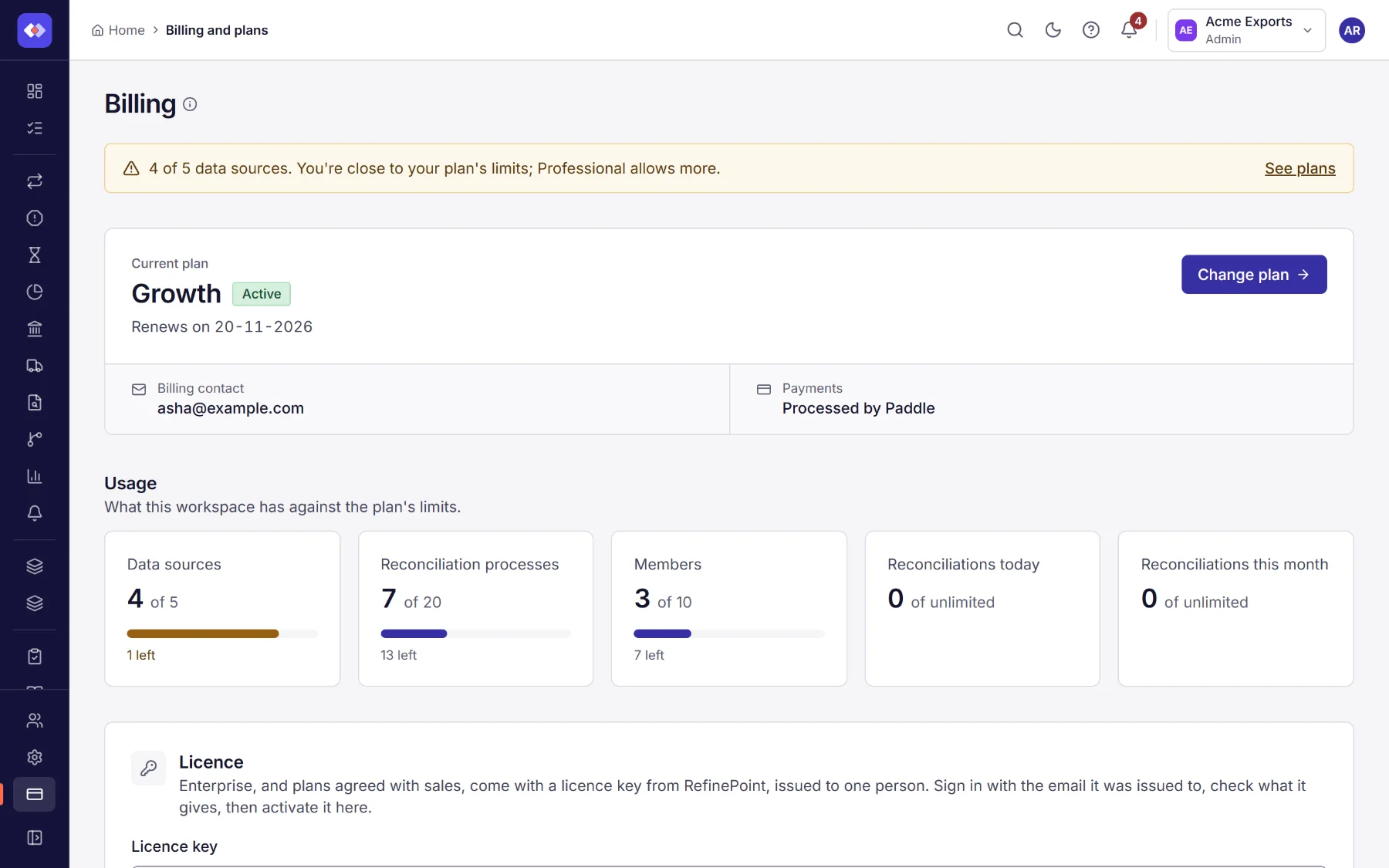
Section titled “Your plan”The top shows the plan, its status (Active, Trial, Payment overdue or Cancelled), where it comes from (a licence, a subscription paid through Paddle, or the free plan), the price and when it renews, and the billing contact. Payment method opens Paddle’s portal, where you change the card or cancel.
What this workspace has against the plan’s limits: data sources, reconciliations and members, each with a bar.
Before you get there: when a workspace reaches 80% of a limit, and again when it reaches the limit, its owners and admins get a notification, and this page shows a banner with what is close. Each is sent once; it can come again after usage falls below 80% or the plan’s limits change. Every workspace is also checked each morning.
Upgrade or use a licence key
Section titled “Upgrade or use a licence key”There are two ways to a bigger plan:
| Way | For |
|---|---|
| Upgrade with Paddle checkout | Starter, Growth and Professional, paid monthly or yearly by card. |
| Licence key from RefinePoint | Enterprise, and plans agreed with sales (your own limits, features or price). |
Plans compared
Section titled “Plans compared”The plans and prices are the same as on the pricing page of refinepoint.com. Prices are in US dollars; Paddle shows your local currency and any tax at checkout. Choose Monthly or Yearly above the plans to see what each costs; paying yearly costs less than twelve months. Each plan card lists what the plan includes. Enterprise has no fixed price: use Contact sales.
The table compares the plans: their price per month and per year, how many members, data sources and reconciliation processes they allow, how many records a run can take, how many reconciliations the workspace may run a day and a month (runs and instant reconciliations counted together), and which features they include.
Reconciliations a day count from midnight UTC: Free 5 (and up to 25 a month), Starter 25, Growth 125, Professional 625, Enterprise unlimited. Paid plans have no monthly limit.
Run results kept: each night, runs older than the plan keeps them are deleted with their results: 30 days on Free and Starter, 90 on Growth, 180 on Professional, no time limit on Enterprise (a licence can set its own). Each process’s latest completed run is always kept, and so are runs that a locked period or a certified account depends on. Export results you need for longer. After a plan is cancelled, the Free plan’s 30 days apply.
Records per run counts each side of a reconciliation on its own: on Growth (25,000) a run can compare a 25,000-row bank statement with a 25,000-row ledger. When a side holds more, the run stops with Failed and names the side and its count; filter the data source down or upgrade. An instant reconciliation from Airtable or monday is refused the same way before it starts.
Features:
- Exports: results and reports as CSV and Excel;
- Alerts: email and webhook alerts on failed runs and large differences;
- Scheduled runs: reconciliations that run on a schedule;
- Data source sync: linked and connected data sources fetched again every few minutes;
- API access: API keys for other systems;
- Bank feeds: statements pulled from your bank (Growth and above);
- Data quality rules: rules on data sources and error records (Professional and Enterprise);
- Single sign-on (SSO): sign in with your company identity provider (Professional and Enterprise);
- Refreshes a day: how many times each person may use Refresh now: Free 10, Starter 50, Growth 200, Professional 1,000, Enterprise unlimited.
Changing plan
Section titled “Changing plan”- Upgrading from Free opens Paddle checkout on refinepoint.com. The plan applies as soon as Paddle confirms the payment, usually within a minute.
- Upgrading a plan you already pay for changes the same subscription; there is no second checkout. Upgrade first shows what it costs: the difference for the rest of the billing period, due now, and the new price from the next bill. Confirm, and the saved payment method is charged and the new plan applies at once. If the payment does not go through, nothing changes.
- Moving to a smaller plan works the same way: Move to shows Paddle’s price of the change, a credit for what is unused of the current plan, which goes towards the next bills. The smaller plan applies at once.
- Cancelling is done in Paddle’s portal (Billing > payment portal). A cancelled subscription keeps its plan until the end of the period it was paid for, then the workspace is on the Free plan, whose 30-day run retention then applies. While a cancellation is scheduled the plan cannot be changed; keep the subscription in the portal first.
- If a payment fails, the plan stays while Paddle retries, and the page asks you to update the payment method.
Licence keys
Section titled “Licence keys”Enterprise, and plans agreed with sales, come with a licence key from RefinePoint (it starts RPL1.). While it is
valid the workspace has the licence’s plan, with any limits and features the licence sets in place of the plan’s.
A licence is issued to one person (an email address). Only that person can activate the key, signed in with that email: a key passed on to someone else does not work for them. RefinePoint emails the key to the person it is issued to.
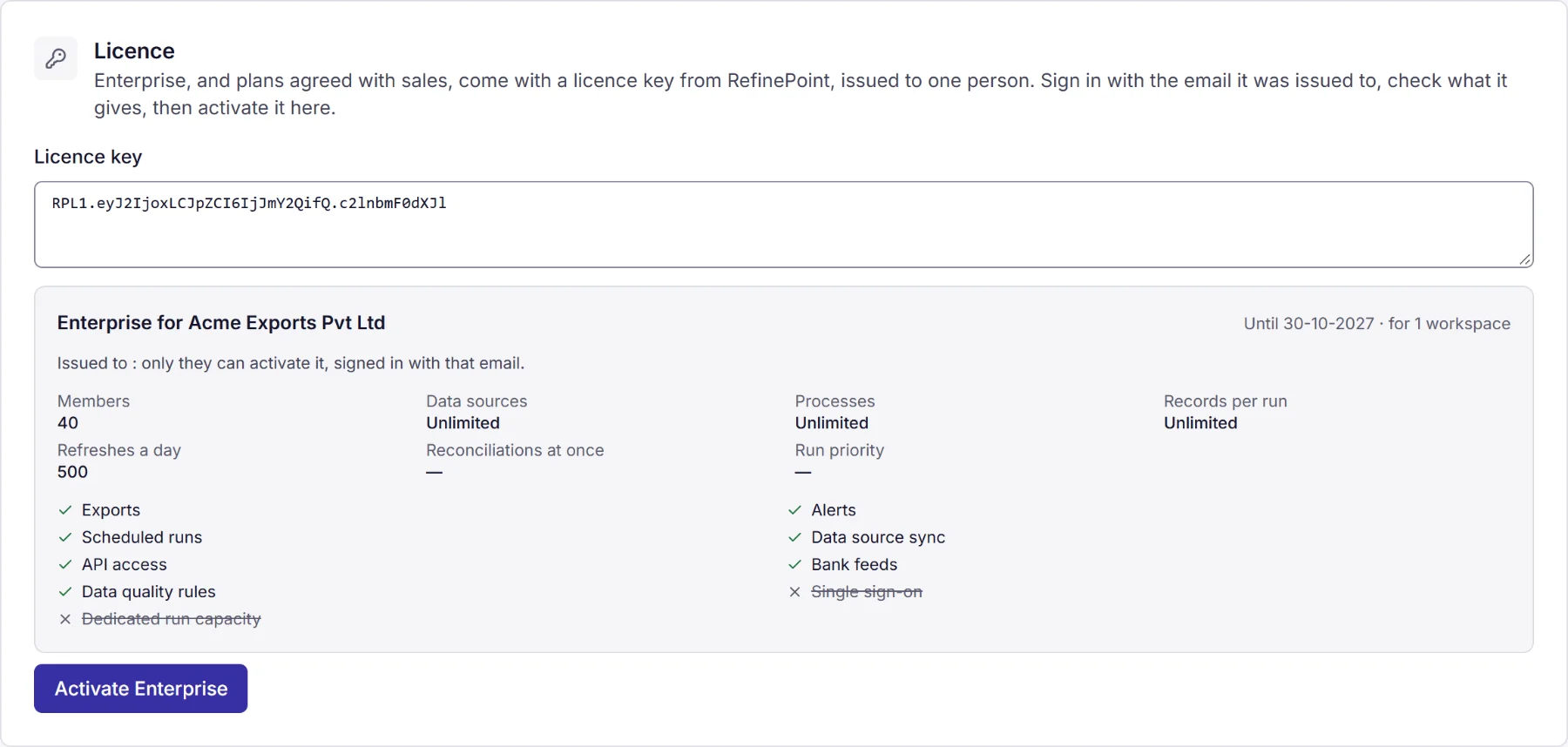
- Sign in with the email the licence is issued to, open the workspace it is for, and under Licence paste the key.
- Choose Check key. You see what it gives before anything changes: the plan, who it is for and until when, the limits (members, data sources, processes, records per run, refreshes a day) and which features are included. A key that cannot be used here says why.
- Choose Activate. The plan applies at once.
- A key is for one workspace, or as many as it says. A key already in use in as many workspaces as it allows is
refused, and so is a key issued to someone else (the check shows whose it is, partly hidden:
p•••@acme.com). - If RefinePoint gives the licence to someone else, the old key stops working and the new holder gets a new key.
- Enter a new key replaces the licence (a renewal). Remove licence returns the workspace to its subscription or the free plan at once.
- When a licence ends, it keeps working for 14 days while this page asks you to renew; then the workspace goes back to its subscription or the free plan. A licence RefinePoint revokes stops at once. Nothing is deleted in either case.
A suspended licence
Section titled “A suspended licence”RefinePoint can suspend a licence (for example while an invoice is unpaid). Every workspace using it then becomes read-only at once, and its owners and admins are told by notification and email:
- Everyone can still open the workspace, see its data and download it (results, reports, exports).
- Nothing can be changed or added, and nothing runs on a schedule: scheduled runs and refreshes stop, and files sent to its SFTP inbox, folders or email addresses wait (email is refused) until it is unlocked. Changes are refused with the message This workspace is read-only.
- A banner says so on every page, with the date the workspace will be archived: 180 days after the suspension.
- An archived workspace cannot be opened at all. Its data is kept.
The workspace is unlocked, archived or not, with its data as it was, when RefinePoint reinstates the licence, or when its holder activates another valid licence here (Billing still works in a read-only workspace).
Invoices
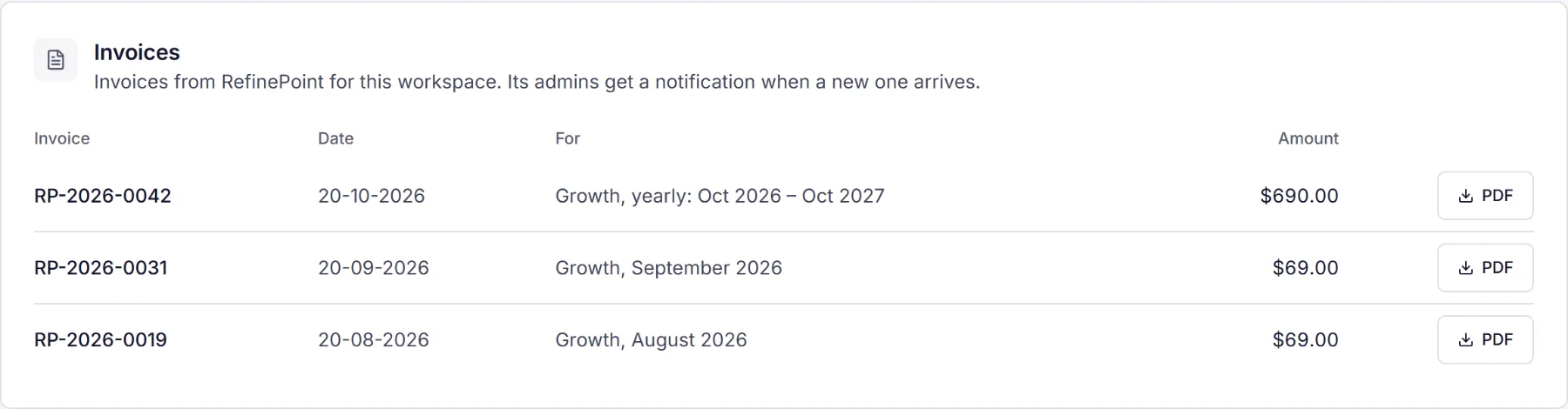
Section titled “Invoices”RefinePoint adds the workspace’s invoices here, as PDFs, and the workspace’s owners and admins get a notification when a new one arrives. Choose PDF to download one.
Paddle also emails a receipt for each card payment to the billing contact.